Vysor


Chrome: There are a variety of ways to remotely control your Android phone. Vysor—from ClockworkMod, the developer behind other popular Android apps like AllCast, Helium, and ROM Manager—may be one of the simplest solutions yet. All you need is a Chrome app.


Vysor works by remotely controlling your phone via ADB (you can check out the easiest way to install ADB on each platform here). The Chrome app will automatically detect any ADB-enabled device connected to your computer. Simply select your device and it will display your phone’s entire screen on your computer.
In order to set up ADB access on your phone, follow these steps:
  1. Open your phone’s settings and navigate to 
    “About phone.”
  2. Tap several times on “Build number” until a toast notification pops up saying you are now a developer.

  3. Navigate to “Developer options” in your Settings app.
  4. Enable USB debugging.
That’s all you need to do on the Android side of things. You don’t need to have an app installed, or give it any escalated access like you do with some other remote control apps. Vysor is still in beta, so it’s got a few bugs, but so far it’s already working pretty well.


How To Hack Some one Facebook Account/ Protect Facebook


Hacking into other peoples’
Facebook accounts is an infringement on personal privacy,
and should be avoided. Knowing how to break into someone’s
Facebook account, however, can help you learn how to protect your own.
To get someone’s Facebook password, a person will
need to either guess the password or search for a password document,
so choosing strong passwords and keeping them safe are vital if you wish to protect your account.
Another party can also gain access to someone’s Facebook account by resetting the password;
if the user has Login Approvals enabled, however,
the only way they can access that user’s account is if they have the user’s mobile device as well.
Despite the security concerns that have plagued Facebook for years, most people are sticking around and new members keep on joining. This has led Facebook to break records numbers with over one billion monthly active users as of October 2012—and around 600 million active daily users.

How to control your other emails Using Gmail


Cydia Impactor

Cydia Impactor


 Cydia Impactor

Cydia Impactor is a GUI tool for working with mobile devices. It has features already, but is still very much a work-in-progress. It is developed by saurik (Twitter and website).
You can use this tool to install IPA files on iOS and APK files on Android. It also can help you exploit the series of Android "Master Key" vulnerabilities.

Download Cydia Impactor for Mac OS XWindowsLinux (32-bit), or Linux (64-bit). (These URLs will always redirect to the most recent versions, so feel free to directly link to the packages from howto guides.)
Note: Do not "Run as Administrator" Impactor; doing this makes drag/drop of files not work on Windows 10.
Also: Tons of people are downloading Cydia Impactor in an attempt to install some kind of Pokemon Go hack in the form of an IPA file... to their Android device... an IPA file is for devices running iOS only, not Android.
If you are on Windows, you may have to install a device driver to talk to your Android device over USB. If your device is not detected, use Impactor's USB Driver Scan feature to attempt to automatically construct and install a driver for your device. You do not need the Android SDK installed to use Impactor.
For iOS, if you are using wither Windows or macOS, you definitely need to have iTunes installed for this tool to work (for different reasons). You do not need Xcode installed to use Impactor (even for features such as signing IPA files).
To download new versions, use "Check for Updates..." under the Impactor menu from inside of the application. Impactor will also occasionally prompt about new versions that come out. (This feature is currently not available in the Linux versions.)

If you are having problems using Cydia Impactor (it crashes, doesn't work on your device, or simply doesn't make any sense) please join #android on irc.saurik.com (for Android questions) or #iphone on irc.saurik.com (for iPhone/iPad/iPod questions). I also recommend this reddit thread for general help with the iOS 9.3 jailbreak (including issues with Impactor).
The Android "Master Key" vulnerability was found by Bluebox Security. For more information on how this bug works, I have done an overly-detailed article on the exploit technique.

How to Take Screenshot of Full Webpage

How to Take Screenshot of Full Webpage


Easily Take Screenshot of Full Webpage with a single click in your web browser using the extension that will quickly make the full page to full page screenshot image in new tab, Follow the below article.


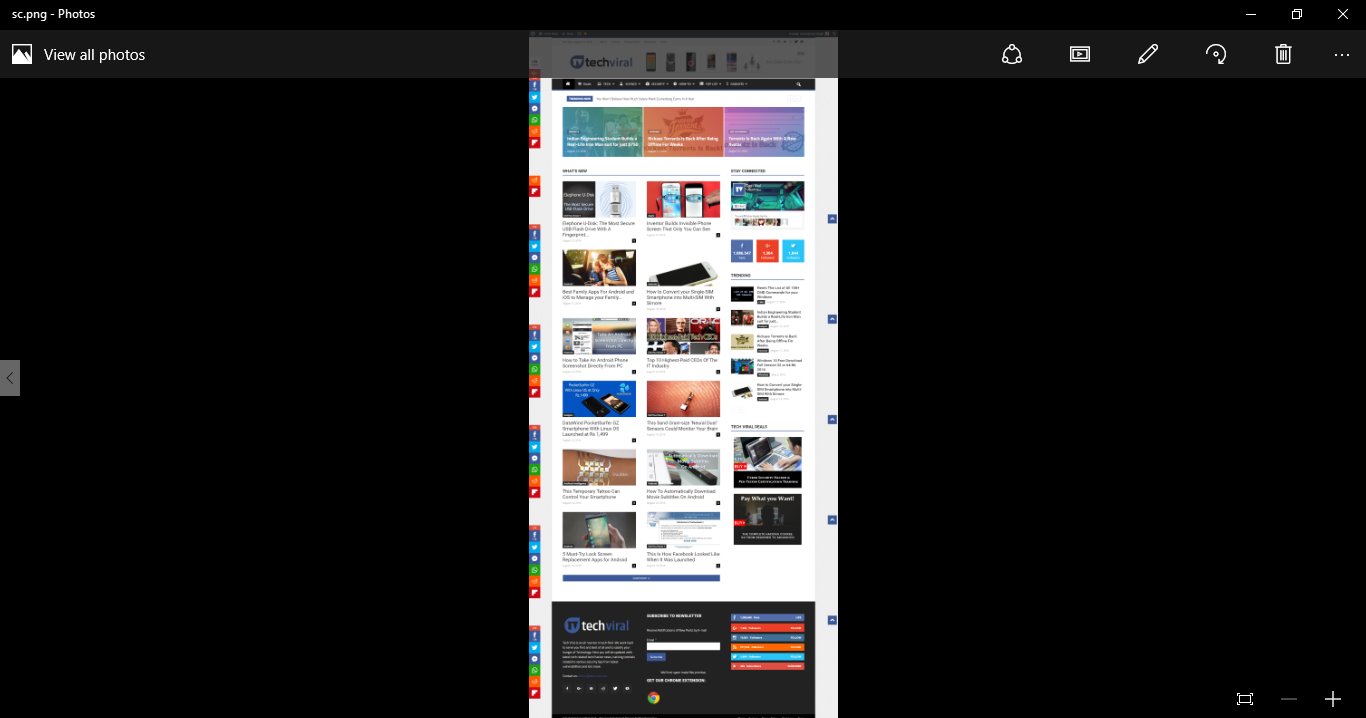
Many of you might keep on searching all new things over the internet. As a tech geek, I also find tech guides but sometimes we need to save some research quick for the later use. In that situation, we keep on taking some of the screenshots or bookmarking the pages. But the most common problem that every user faces is the screenshot of the complete web page as usually this is taken on the current screen resolution and I am sure almost every website page is captured in the 2-3 screenshots, and that can increase your work quite more. And what if you can take the complete web page screenshot in a single go. Yes, it’s possible as in this guide we are discussing the same. And with the help of this, you can quickly capture the complete web page screenshot with the single click. So have a look on complete guide discussed below to proceed.


How to Take Screenshot of Full Webpage

The method is very simple and straight, and you just need to use a simple browser extension that will take screenshot instantly of the complete web page. So follow up the below step by step guide to the proceeding.

Steps To Take Screenshot of Full Webpage:

  1. First of all in your browser, you need to add the extension that will take the complete web page screenshot for you and the extension Full Web Page Screenshots will be helpful and this is available for both Mozilla Firefox and Google Chrome.
  2. Visit the page and add this extension in your browser, and within seconds it will get added to your browser.
    Capture Full Webpage Screenshot
    Capture Full Webpage Screenshot

  3. Now you will see the camera like icon at the top right corner of your browser that indicates that extension is successfully added to your browser.
  4. Now you need to open the web page whose full page screenshot you want to capture.
  5. Now just click on the camera icon there and this will take 2-3 seconds and screenshot will get captured and will get opened in new tab and you can directly save that image to your computer.
    Capture Full Webpage Screenshot
    Capture Full Webpage Screenshot
  6. That’s it, you are done, now you will have the complete web page screenshot in the single click.


So above discussion is all about Take Screenshot of Full Webpage. By using the above guide, you can easily save the complete web page in a single screenshot, and that will be greatly helpful in your daily use. Hope you like this, keep on sharing with others too. Leave a comment below if you have any related queries with this.

Reliance Jio Tariffs: Rs.50 for 1GB 4G Data, All Voice Calls Free

Reliance Jio Tariffs: Rs.50 for 1GB 4G Data, All Voice Calls Free


Reliance Jio 4G launch: Mukesh Ambani says all voice calls will be free on Jio, data rates to cost as low as Rs 50/GB or you can say 5 paise per MB.


As we all know that Jio, also known as Reliance Jio and officially as Reliance Jio Infocomm Limited, it is an upcoming provider of mobile telephony, broadband services, and digital services in India.

Reliance Jio which was previously available to users of Only Lyf Smartphones. Recently Reliance had launched a preview offer for its JIO Sim and extended its services to many other smartphone manufacturers too.
The preview offer was actually free. Users can get the Jio sim for their smartphones from their nearest Digital store or Xpress Mini Store. The free sim includes 3 months of unlimited Voice calls, SMS and Free 4G internet.

According to the latest reports, Mukesh Ambani’s game-changing Reliance Jio will force the country’s top operators to rethink their strategy. Because Mukesh Ambani finally broke the silence on the tariffs for Reliance Jio.
Users can optimize their data rate to cost as low as Rs 50/GB or you can say 5 paise per MB. The best part is the company will not charge for voice calls that mean voice calls will be free.

Chairman Mukesh Ambani Said “Current market practice is to charge for data a base rate between Rs. 4,000 and Rs. 10,000 – Jio will have a base rate which is 1/10th of this. Our data plans go even further with an effective rate of 5p/MB or Rs. 50/ GB.”
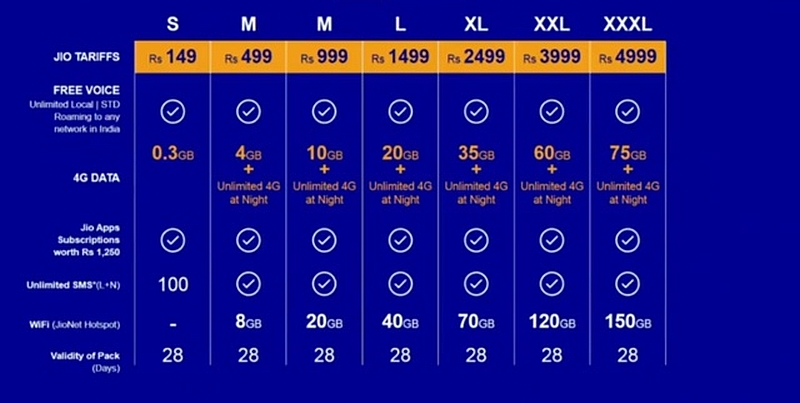
If we look at the plans chart then things looks different from the Rs 50 for 1GB that was announced let’s have a look at the tariffs chat.


It is still not clear where that Rs50/Gb comes into play. However, if we look at the history of Reliance Jio then one thing is for sure, we will get to see something exciting very soon.

How to Check your Vehicle's Current Traffic Penalties or Fine in Kerala Police e Payment Service

Check your Vehicles Current Penalties or Fine in Kerala

Kerala police e payment


If you ever caught by the police for any traffic violation and you don't pull over for the police, and you want to check whether the police noted your number and charges you?.


ഓവർ സ്പീഡിനു, ഹെല്മറ്റ് ഇല്ലെങ്കിൽ, ഗ്ലാസിൽ പേപ്പർ ഒട്ടിച്ചതിന്, റോങ്ങ്‌ സൈഡിൽ വണ്ടി നിറുത്തിയതിന് ഇങ്ങനെ പോലീസ് ഏതൊക്കെ കാര്യത്തിനാണ് നിങ്ങളുടെ വണ്ടി നമ്പർ നോട്ട് ചെയ്ത് പിഴ ഈടാക്കി എന്നറിയാൻ ഇപ്പോൾ വലിയ പാടാണ്. 3 മാസം കഴിഞ്ഞു പിഴ പേപ്പർ വീട്ടില് വരുമ്പോൾ മാത്രമേ കെണി മനസ്സിലാകൂ.


നിങ്ങളുടെ വാഹനത്തിന് ഏതെങ്കിലും കേസുകളില്‍ പെട്ടോ മറ്റോ പിഴ ഇടാക്കിയിട്ടുണ്ടെങ്കില്‍ നിങ്ങള്‍ക്ക് കേരളാ പോലീസിന്റെ ഈ സൈറ്റില്‍ വാഹനത്തിന്റെ നമ്പര്‍ വെച്ച് പരിശോധിക്കാവുന്നതാണ്.


Kerala police e payment


  • Go-to Kerala Police Department Online Payment page http://www.payment.keralapolice.gov.in/
  • Enter your Vehicle Number and click Search
  • Select the charges you want to pay click Proceed to Pay

Kerala police e payment


  • You can pay your fine with Net Banking, Debit Cards, Credit Cards etc.
ഷെയര്‍ ചെയ്യാന്‍ മറക്കല്ലേ നിങ്ങളുടെ കൂട്ടുകാര്‍ക്ക് ഉപകാരപ്പെട്ടെക്കാം


Transfer files between your Mac/windows and any android device


How To Install Custom Template On Your Blogger Blog


How to Skip windows login screen and sign in automatically.


Windows  runs a tight ship by throwing up a lock screen and a log-in screen before you can dive in. But you can easily bypass those screens so you don't have to type your password every time. Here's how:
  1. From the Start screen, type netplwiz. The command for netplwiz, aka the User Accounts Control Panel, appears in the search results in the left pane. Click that command.
  2. In the User Accounts Control Panel, select the account you wish to use to log in automatically.
  3. Click off the check-box above the account that says "Users must enter a user name and password to use this computer." Click OK.
  4. Enter your password once and then a second time to confirm it. Click OK.
  5. Restart Windows. Windows now bypasses the lock screen and the log-in screen to automatically take you to the Start screen.
  6. Change your mind? To re-enable the log-in screen, simply return to the User Accounts Control Panel using the steps above and click on the check-box for the "Users must enter a user name and password to use this computer" option.


Running the netplwiz command to bypass the log-in process also works in previous versions of Windows. But it's especially helpful in Windows 8, where the Lock screen and log-in screens are enabled by default.
Those of you trying out the Windows 8 Release Preview in a crowded office may want to keep the log-in screen turned on. But for anyone who doesn't need the tight security, this process can shave off a couple of steps each time you want to launch Windows.


Who Deleted Me on Facebook


How to increase volume of PC to maximum


Watch Malayalam Live TV channels on Your Windows PC

POTPLAYER

potplayer
Daum PotPlayer is an application for playing audio and video with numerous features, support for themes, captions, playlists, TV channels, DVDs, audio effects, various plugins, and more. It is based on the famous KMPlayer, one of the most well respected programs of the genre.
The PotPlayer is a simple application and it works basically like all other multimedia players. You can select hundreds of video or audio files to be opened in sequence and then control by control panel present on the screen of the player.
Audio and video
You can create playlists to watch several movies and listen to songs in sequence in Daum PotPlayer. The program supports virtually all existing formats and does not require the installation of codecs to run the files. Simply drag them to the screen program and the fun soon begins.
Several options
By clicking with the right mouse button on the application window, you have access to a large number of options. From there, you can set general options or related to subtitle files, profiles and video and audio effects, filters, video aspect, size and resolution, change the subject and some other options.
Above you gave a full description on the Daum PotPlayer and its functionalities, know now what we think of him
Daum PotPlayer is an excellent option for those looking for a complete and practical program, is to listen to music, be it for watching movies. Its highlight is the amplitude, because it supports dozens of different media formats, supports playlists, has control of subtitles, and more.
In short, what this means is that the Daum PotPlayer can handle practically any multimedia you need have, all in an intuitive environment, which facilitates the understanding of all its tools.
Another interesting point is discretion, because the program works from a gift icon in the Windows notification area. That way, you have access not only to the screen of the application, but also to all of your tools. This makes the management of the program something more simple and efficient.
It can still be highly customized, with different behaviours being changed manually (even if it should or not display icon in the Windows taskbar). The number of advanced options cannot be left aside.
The Daum PotPlayer, you can use an equalizer to control the audio, advanced tools to control the color, brightness and contrast of your videos, a control panel for managing subtitles, plus a series of keyboard shortcuts that ensure quick access to virtually everything that the program offers.
Perhaps, the only setback of Daum PotPlayer is the language. As he offers a plethora of features, many cannot be leveraged to the Max for this small barrier. Other than that, there is absolutely nothing to complain about, because here is a powerful and easy-to-use player.

(ലിങ്കിൽ ക്ലിക്ക് ചെയ്ത് സ്ക്ക്രീനിന്റെ മുകളിൽ വലതു ഭാഗത്ത് 5 സെക്കന്റ് Wait കാണിച്ച്,  Skip Ad എന്നൊരു ബട്ടൺ കാണാം. അതിൽ ക്ലിക്ക് ചെയ്യുക. അതിൽ  ക്ലിക്ക് ചെയ്താൽ നിങ്ങൾക്ക് വീണ്ടും ഒരു 5 സെക്കറ്റ് വെയിറ്റ് ചെയ്തതിന് ശേഷം 

Skip Ad എന്ന ബട്ടണിൽ  ക്ലിക്ക് ചെയ്യുക. 

ഡൗൺലോഡ് ചെയ്യുന്നതിനോ ഓഫർ ലഭിക്കുന്നതിനോ  നിങ്ങളുടെ മൊബൈൽ നമ്പർ ആവശ്യമില്ല. എവിടെയും മൊബൈൽ നമ്പർ കൊടുക്കരുത്. Skip Ad എന്ന ബട്ടണിൽ മാത്രം ക്ലിക്ക് ചെയ്യുക.)